
As regular readers of my ramblings will know, I have complained about the colours produced by my Panasonic G9. As a result, I even found myself buying an Olympus EM5. After some time with that, I felt extremely pleased with its colours and started using it instead of the G9. Then someone suggested on this blog that I test the two side by side, which I thought was an excellent idea.
This week, I finally got my chance with a day trip to the Lake District. I packed both cameras and headed off, determined to compare the colours, and investigate my problems with the EM5 high-resolution mode.
What a surprise I got.
The following image is typical of what I saw in many shots that day.
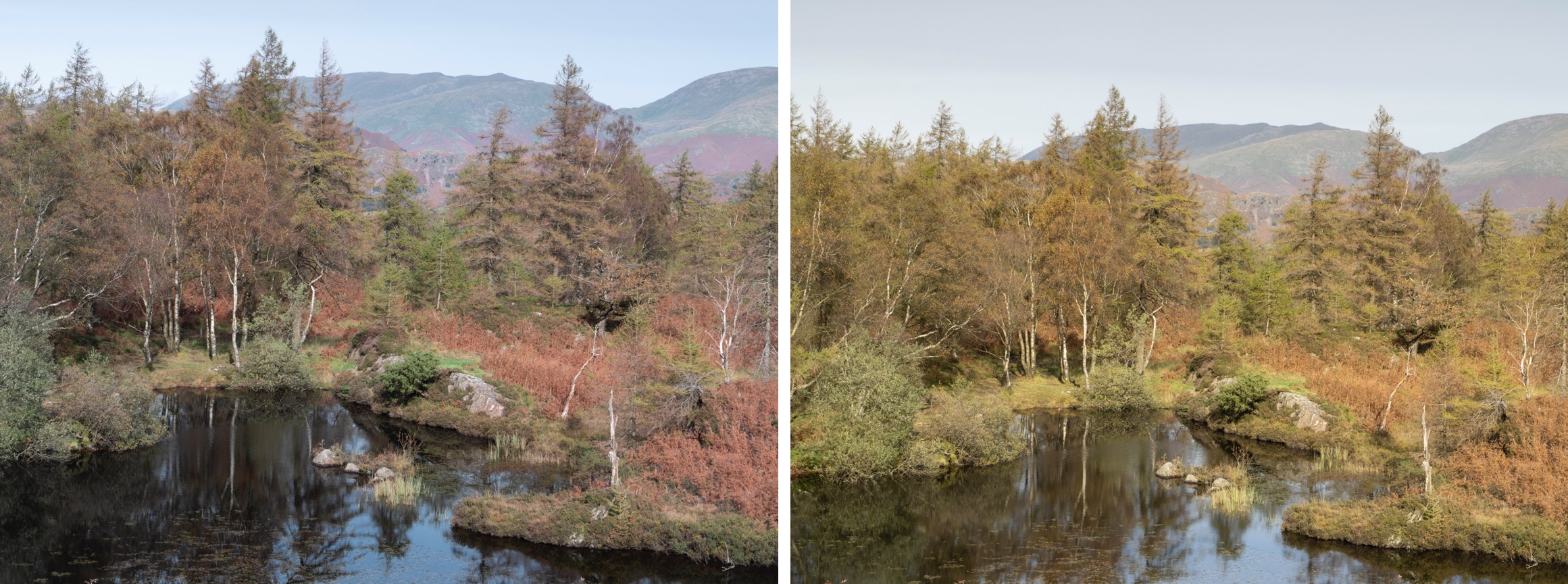
These images are the embedded JPEG preview images in the RAW file. The G9 is on the left and the EM5 is on the right. This is the opposite of what I expected to see, and if I’m honest, I prefer the cooler colours of the G9.
I then opened the RAW files to compare those.
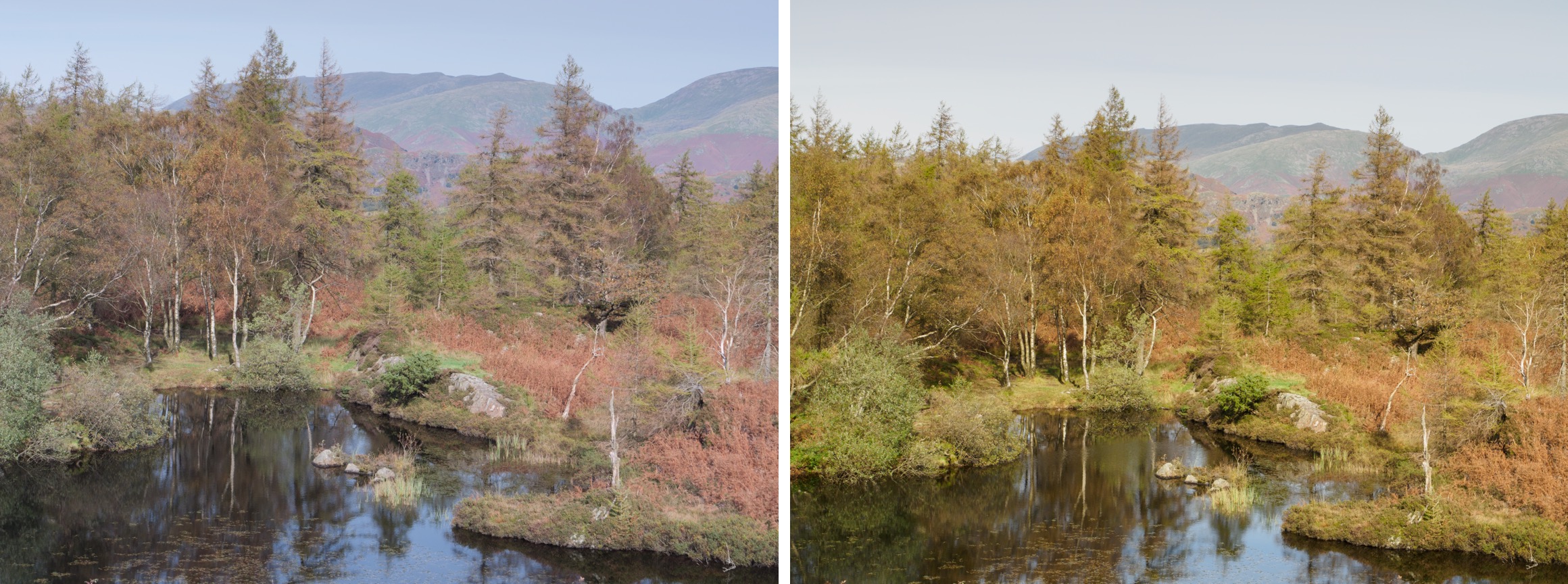
The G9 is again on the left and the EM5 on the right. The RAW files haven’t been processed at all. Both camera profiles are set to “Natural”, their default. The only difference is that one profile is Panasonic, and the other is Olympus.
This seemed to saturate the warm colours in the EM5 but left the G9 RAW file looking washed out. But there still is a significant difference between the two sets of colours.
As a final check, I set the colour profile for both RAW files to use “Adobe Color”. Here’s the result of that.

This has darkened the G9 RAW file, and the colours are nicer to my mind. Interestingly, the effect on the EM5 RAW file is to reduce the saturation and warmth.
Despite these minor differences, two things stand out to me:
- There is a significant difference between the G9 and EM5 colours.
- I find the G9 colours too cool and the EM5 too warm although the EM5 is nearer to how I remember the day.
I’m now feeling utterly confused and questioning my earlier misgivings about the G9 colours.
After all that, here’s one of my last shots of the day.

This was taken around 30 minutes after sunset. It’s a handheld shot with the EM5 and Leica 12-60 lens at 32mm. It’s a 1/10 second exposure at f/5.6 and ISO800. Despite all my concerns about colour accuracy, I love the colours captured in this image.
As for the EM5 high-resolution mode problem where it produced soft images, yes, I did resolve that. I’ve explained everything in this post on my website. Be sure to read through to the very end for the update.
I hope you like the image and have a great weekend.
 The Lightweight Photographer
The colour differences here are quite striking. Did you compare the white balance values the cameras came up with? Sometimes you have to try to standardise the WB – temperature and tint – to get a usable comparison. The Raw developer will be reading the recorded values from the meta data. You may be able to copy the values from one image to another – I do this in Capture One.
“I’m now feeling utterly confused”
This is generally how I feel after carrying out this kind of comparison!
No, I didn’t standardise the settings for this comparison. I was more interested in how the AWB shots looked. When I do set the Temp and Tint to the same, they still appear quite different, but obviously not as much as in the examples. What’s really bothering me is not that they are so different but why did I think the G9 produced horrible colours when set to AWB. Memory is an odd thing.
I am confused too!
I do have an Olympus EM5ii, and I can’t find any images from it that look anything like your EM5 image. The difference between these two images is extreme. As I look through my saved images, I have had 3 different Olympus cameras, and quite a number of Sony cameras, and there just isn’t much variation in color between them. And it doesn’t seem to matter if I let Adobe demosaic them, or DxO or whatever. They just don’t vary that much in color. And I do set the camera for “natural”. I don’t like the other choices at all.
Maybe its the time of day that is exasperating the different look?
Downloading your JPEG into Photoshop, and playing with the new Point Color Tool, I can adjust the reds on the EM5 up a bit to more closely match the G9 which tells me that the reds are buried in the image but not as saturated. But I don’t have an answer as to why you are seeing this???
Jim Herr
Yes, I agree. The reds are buried in there but being overpowered by the yellow. I know I didn’t align the colour temp which has probably confused things but I now find myself liking the G9 more. Interestingly, I have both cameras set to retain warm colours in the AWB. With the G9 it doesn’t seem to be having much of an effect. I’ll need to give this more thought.
Are you doing a custom White Balance with these two cameras for which they are responding differently? If using one of the standard supplied WB settings such as ‘Sunny’, I suppose they would look more similar. If a custom WB is not done exactly the same on the two cameras, then results can vary.
Jim Herr
No custom WB but I think we are getting sidetracked here. This all started because the G9 was performing oddly. It showed problems when whooting towards the sun, and also the colours appeared oddly yellow. I’ve been complaining about it for a long time which is why I bought the EM5. It was only because someone suggested comparing the two side by side that I shared the results. If you had shown me the two results siude by side I would have said the G9 was shot on the EM5 and vice versa. This really is all about me trying to get to the bottom of the strange results I had been getting with the G9.
IME with earlier generations of Olympus cameras, I found they increased the saturation a little more, and over-sharpened, compared to Panasonic.
Like photo9000, I worry you’re comparing the camera’s AWB more than color rendering. If I were trying this comparison I would set both cameras’s WB from the same grey card right before taking the photos.
This test might also be comparing the camera’s internal color mode, which the camera used to generate the thumbnail jpg. The mode named “Natural” in Panasonic is not the default (that’s called “Standard”). The manual says the Natural photo style has a soft effect with low contrast.
Comparing the “unprocessed” raw like this always seems odd to me. The raw had to be processed so we could see it. So here we’re comparing the result of the camera’s filter stack and sensor fed into the default rendering of the software we used to process the raw (which itself, since the colors are very close to the thumbnail jpg produced by the camera, seems to be imitating the camera’s raw developer by using the exif information).
So the hires softness was a combination of both f/8 and OIS. The len’s best f-stop is needed when asking it to produce high resolution images. That’s a combination of diffraction and lens design & defects. There are charts of f-stop v. resolution for many lenses online.
I think I’ve confused things by not aligning the Temp and Tint settings. I’ll probably show that another time. Even if I align them, you can see the difference. What’s interesting on this occasion is that the G9 has produced better colour. Usually, the RAW files look completely washed out, and the colours have an odd tint to them. I’ve complained about it a lot in the past. This time, the opposite seems to have happened.
Yes, the RAW file must be processed to see it, but it’s a starting point. It’s then the Colour Profiles that determine the rendering of the colours captured. If I have the same profiles and same settings, then any difference has to be down to the camera.
Hi Robin,
Many years ago I changed from a Nikon D300 to a D800.
I had become very used to the D300 and had taken many successful images with it.
While the extra pixels and the improvements in camera technology were very obvious in the D800, the difference in colour output nearly drove me crazy and I spent many hours processing the results, trying to make them appear the same.
I eventually gave up trying and just concentrated on getting the best result out of the D800.
I was soon turning out images I was very happy with and my photography again became the relaxing pastime it was meant to be.
I still sometimes use the D800, but have since added a Sony A7r2 as my go to camera.
I find the output of both cameras quite different, but I still get good results from either and enjoy using both as well.
I hope that helps,
Regards John Taylor.
Thanks John. You are quite right. It’s the results at the end of the day that matter. But this all started because I was questioning the quality of the results from the G9. I just want to feel happy picking up either camera and shooting with it. At the moment when I pick up the G9 I tend to put it down again thinking I will get washed out images with too much yellow. This latest test shows me that isn’t the case.
Now I’m no doubt showing my ignorance here lol but…… does it matter? I see the differences but if you prefer one camera over another in all other aspects and the RAWs capture the information then isn’t it a case of accepting the RAW image and creating and applying a default colour profile to your liking in processing software for imports of those images? As a start point. As I say I may well be missing something so treat me kindly but I’m wondering if you’re not starting to go down rabbit holes Robin 😂🐰😂
No it doesn’t matter. What this is really about is trying to understand some of the strange results I have experienced in the past with the G9. Colours would look unusually yellow and washed out. I would also see a lot of lens flare when it was sunny. The results I got with this test are the opposite of what I had expected with the EM5 being warm and the G9 very cool. Yes it’s a rabbit hole. More important is figuring out why my new keyboard is adding and removing letters randomly and periodically freezing. It’s driving me mad.
Ha ha thta muts be terrilebe Robn
Just what I need – humour
Hi Robin,
I think you do have something weird going on there. I’ve just compared test photos made with a GX-80 and an E-M1 mk2, all shot with AWB, in RAW+JPG using a 25mm f/1.7 Lumix lens and a 12-40mm Olympus PRO set at 25mm. Both lenses were set at f/2.8 and used on both bodies. Both cameras were set to natural picture style and sRGB colour space. The target was a colour sample test shot displayed on my iMac screen.
Apart from slight exposure variations, I can hardly tell the difference between the JPGs whatever combination of camera and lens was used. Certainly there weren’t any obvious colour differences between any of the lens/camera combinations.
The RAWs were a bit more confusing as they showed colour differences compared to the OOC JPGs. Turns out that the RAW developer used is somehow responsible for this. When I compared the Olympus JPGs and ORFs in OM Workspace, the ORFs previewed exactly like the OOC JPGs but in DXO Photolab, Apple RAW and Affinity Photo, there was a distinct shift in the blue between the Olympus OOC JPG and the previewed ORF files. The Lumix RW2 files showed the same issue but none of my available RAW developers gave a nice preview match for the OOC JPGs. I don’t have SilkyPix or any Adobe RAW s/w installed so I can’t tell how those behave with the Lumix RW2 files. That’s a rabbit hole for someone else…
Thanks Ian. That’s very interesting to hear. I’m not sure that I will ever get to the bottom of it. I have compared the output of my G9 with that of a friends and my images appear washed out and lacking colour despite us using the same settings.
If you are shooting raw, any difference in colour is 99% down to the raw convertor manufacturer’s camera profile. You can completely change the look by using a different profile or making your own custom profile.
Colour differences are not anything to do with the cameras themselves. There is no such thing as Olympus or Panasonic raw colour (there may be tiny differences in the CFA array dyes, but these are inconsequential), just the camera raw profile used.
https://blog.kasson.com/the-last-word/roles-of-camera-and-raw-developer-in-determining-color/
Regards
Dave
Hi Dave, thanks for the link. There’s a long trail of post on this subject and there is something odd with my G9. It isn’t only colour that’s the problem. A lens that produces a sunstar on another camera won’t on my G9. Filters produce coloured rings on this camera and not others using hte same lens. The colours are completely washed out in my images when comparing two G9’s using the same settings and lens. When you try to correct the G9 RAW files the yellows often turn an odd colour. Many of these problems also don’t appear consistently. Sometimes the camera is great and other times it’s terrible.